.avif)


.svg)
From Idea to Live: How to Create a Custom Website with Webflow
Your Website Is Costing You Leads Right Now

Webflow create website projects are fundamentally different from traditional web development. Instead of waiting weeks for a developer to translate your vision into code, you build directly in a visual interface that generates clean, production-ready HTML, CSS, and JavaScript automatically. Here's what you need to know:
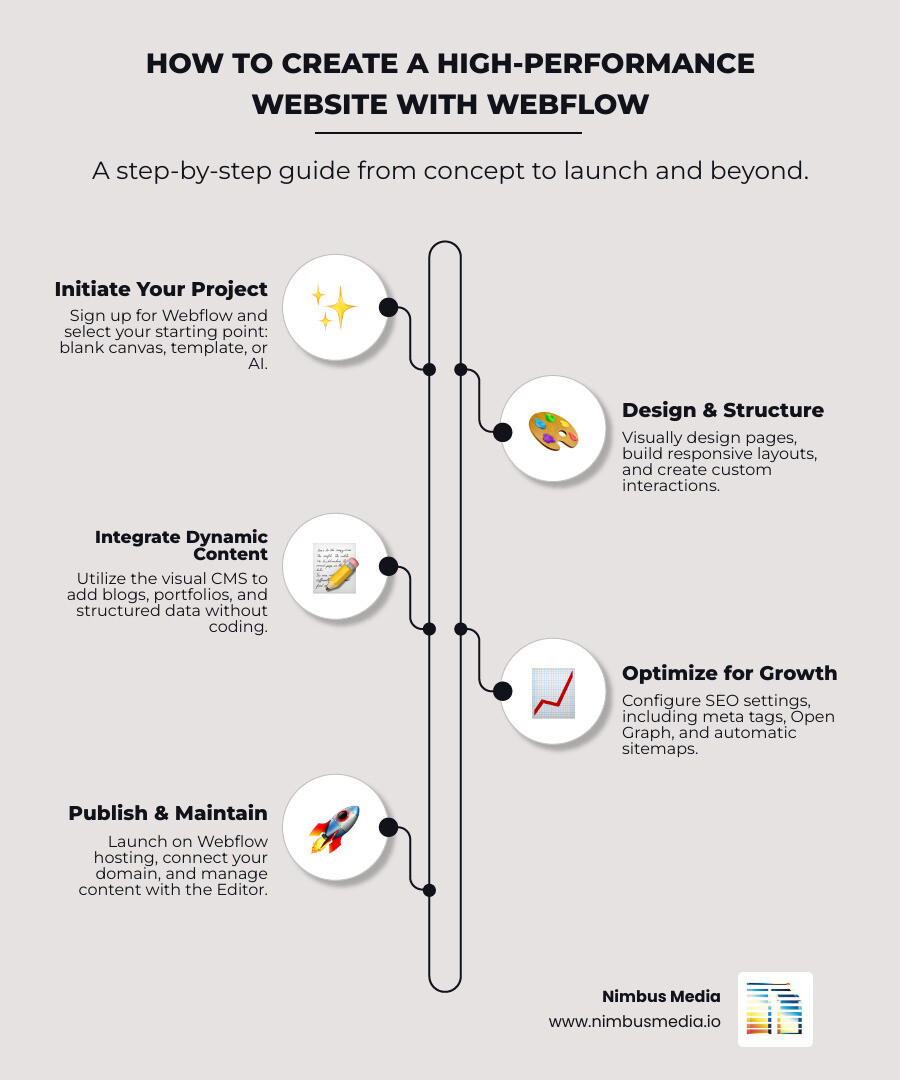
How to Create a Website with Webflow:
- Sign up for a free Webflow account at webflow.com
- Choose your starting point: blank canvas, professional template, or AI site builder (beta)
- Design visually using the Webflow Designer with drag-and-drop elements
- Build responsive layouts that work across desktop, tablet, and mobile
- Add dynamic content using the visual CMS for blogs, portfolios, or team pages
- Configure SEO settings including meta tags, Open Graph, and automatic sitemaps
- Publish to Webflow hosting or connect your custom domain
- Manage content ongoing using the intuitive Editor interface
Your website is the first place prospective clients go after they hear your name. You know this. And you know what they see does not match the quality you deliver.
This guide is about closing that gap.
Most business owners are stuck in a frustrating cycle. Their WordPress site breaks every time a plugin updates. Load times hover around eight seconds. Security vulnerabilities stack up. And every change requires calling a developer who may or may not respond within a week.
Meanwhile, competitors with inferior services are getting the leads because their websites actually work.
Webflow changes this equation. It is a professional web design platform that delivers enterprise-grade performance without the traditional barriers of coding or the maintenance nightmares of plugin-dependent systems. You get complete design control, sub-five-second load times, built-in security, and a visual content management system that your team can actually use.
This is not about templates that make every business look identical. This is about building a custom digital presence that reflects the sophistication of your work and converts visitors into qualified leads.
I'm Wael Esmair, founder of Nimbus Media, and I've built over 50 custom websites exclusively on Webflow for professional services firms and Houston-based businesses that need results, not excuses. When you webflow create website projects with the right strategy and execution, you transform a cost center into a revenue-generating asset.
Why Webflow is the Platform for Professional Website Creation
A website platform should not limit your ambition. It should be a tool that gets out of your way. Webflow is that tool. It provides the power of code without the traditional barriers, allowing for the creation of custom, high-performance websites that reflect the quality of your business. It is built for those who refuse to settle for a template.
Control Without Code: The Webflow Designer
Webflow's visual design platform makes it easy to create stunning websites without writing code. The Designer is our core tool. It allows us to develop and customize every element of a website, from layout to animations, all through an intuitive visual editor. As we design, Webflow automatically generates clean HTML5, CSS3, and JavaScript. This means pixel-perfect control without the need for traditional coding or the constant battle with fragile plugins.
Content That Works for You: The Webflow CMS
Your content is your message. It needs to be managed effortlessly. Webflow's Content Management System (CMS) is a straightforward, non-technical way to organize, change, and update all the content on your website. We can build a custom CMS from the ground up, without writing PHP or database code. This allows us to structure and format your content exactly how you want it. Your team can then update site content directly, without relying on developers.
Building dynamic websites with Webflow
Performance and Security You Can Trust: Integrated Hosting
A slow website costs you leads. A vulnerable website costs you trust. Webflow's integrated hosting is best-in-class, powered by Amazon Web Services (AWS) and Fastly's global Content Delivery Network (CDN). This infrastructure ensures enterprise-grade speed, boasting sub-five-second load times for our clients in Houston, Cypress, and Katy. We get 99.99% uptime, automatic SSL certificates for data security, and robust protection against DDoS attacks. Your website is always fast, always secure, and always working for you.
The Blueprint: Planning a Website That Builds Trust
Before you place a single pixel, you must have a strategy. A successful website is not a collection of pages. It is a carefully constructed argument for why a client should choose you. The design decisions that matter are actually strategy decisions in a visual disguise.
Structuring Your Message for Your Ideal Client
Your website needs to guide prospective clients to the information they need, when they need it. We start with strategic planning, defining one primary metric for success that ties directly to your business outcomes. We map out the user journey, understanding your buyer persona's pain points and where they seek answers. This process dictates the sitemap and content hierarchy, ensuring every call to action is strategically placed. Our goal is to structure your message around your client's problems, not your internal organizational chart.
Designing for Credibility and Conversion
First impressions matter. For professional services firms in Houston, credibility is everything. Our design process focuses on creating a visual experience that matches the sophistication of your work. This involves creating a comprehensive style guide, making deliberate typography choices, and using color psychology to evoke trust. Strategic use of white space ensures clarity and readability, while a clear visual hierarchy guides your clients through your message. This is how design decisions translate into conversions.
Ensuring a Flawless Experience on Every Device
Your clients are everywhere. They are on their desktops in The Woodlands, their tablets in Memorial City, and their phones commuting through Conroe. Your website needs to look and perform flawlessly on every screen. Webflow's breakpoint system allows us to design responsively, adjusting the layout for different screen sizes. We adopt a mobile-first approach, ensuring that your site loads quickly and provides an optimal viewing experience for the 64% of mobile users who won't wait more than four seconds for a page to load.
How to Webflow Create Website: A Practical Guide
This is where strategy becomes reality. Whether starting from a blank slate or a flexible template, Webflow provides the components to build a site that is both visually impressive and functionally powerful. The process is direct and the results are tangible.
Starting Point: Blank Canvas or Professional Templates

When you webflow create website projects, you have choices. You can start with a completely blank canvas, giving you maximum creative freedom to build a unique digital presence from the ground up. Or, you can leverage Webflow's extensive library of over 100 beautiful, flexible templates, including 21 free options. These templates provide a solid framework, allowing us to accelerate the design process while still customizing every element to fit your brand. We can clone a "Made in Webflow" site and quickly tailor it to your specific needs, making it a great starting point for local businesses in Magnolia or Tomball.
The Building Blocks: From Sections to Interactions
Webflow's visual canvas is built on the fundamental principles of web design. We use elements like Sections, Containers, and Divs to structure your content. The Box Model, a core concept in CSS, becomes intuitive. Crucially, we leverage CSS classes for consistent styling across your site, ensuring brand uniformity. For elements that appear on multiple pages, Webflow's Symbols allow for reusable components. Edit one Symbol, and it updates everywhere. We also add engaging interactions and animations with just a few clicks, enhancing user experience without a single line of custom code.
How to use Webflow to create website content with the Editor
Once your site is built, managing its content should be simple. Webflow's intuitive on-page Editor is designed for non-technical users. Your team can make content changes directly on the live website, seeing exactly how edits will appear to visitors. This empowers you to update text, images, and even add new CMS pages without needing a developer or navigating complex backend dashboards. For collaborative projects, features like commenting allow for client feedback and team discussions directly on the page, streamlining review cycles.
Launch and Optimization: Turning Your Site into a Growth Engine
A website is not finished when it goes live. It is just getting started. The launch is a milestone, not the destination. The real work is in the ongoing optimization that drives visibility, generates leads, and builds authority.
How to use Webflow to create website SEO settings for visibility

Visibility is paramount for businesses in Houston. Webflow provides all the tools we need to optimize your site for search engines. We configure page-level title tags and meta descriptions for both static and dynamic content. We implement Open Graph settings for social sharing, automatically generate sitemaps, and set up 301 redirects to preserve SEO value when pages move. This comprehensive suite of built-in SEO tools helps your site get found. Modern SEO focuses on entity authority and topic clusters, and Webflow allows us to implement these strategies effectively, helping your business rank higher in local search results.
Extending Functionality with Integrations and Custom Code
Your business has unique needs. Webflow is highly extensible. We can integrate your site with over 500 popular apps using Zapier, automating backend processes like CRM integrations and lead filtering. For more advanced functionality, Webflow allows for custom code embeds, giving us the flexibility to build almost anything. Whether it is a unique calculator, a complex booking system, or connecting to third-party APIs, Webflow provides the foundation.
Publishing Your Website and Connecting a Custom Domain
When your site is ready, publishing is instantaneous. You click a button, and your site goes live. We connect your custom domain seamlessly through Webflow's hosting settings. This process also includes managing staging and production environments, allowing us to test changes thoroughly before they go live to the world. You can publish your website directly to Webflow's secure, high-performance hosting or, if you need the code for other purposes, Webflow allows you to export clean HTML, CSS, and JavaScript files.
add your domain
Frequently Asked Questions about Building with Webflow
Clear answers to common questions help you make better decisions. Here are the essentials.
What sets Webflow apart?
Webflow offers unparalleled design freedom. Unlike template-heavy builders, it allows for pixel-perfect customization without coding limitations. The code it generates is clean, semantic, and production-ready, making your site fast and SEO-friendly. Its integrated hosting, powered by AWS and Fastly, delivers enterprise-grade performance and security, ensuring sub-five-second load times. The visual CMS is flexible, allowing for custom content structures that truly fit your business, without the need for fragile plugins that often break on other platforms.
What are the most common mistakes to avoid?
The biggest mistake is skipping the planning phase. A website project without a clear strategy is gambling with your investment. Other common pitfalls include inconsistent styling, which dilutes your brand message, and poorly named CSS classes, which create technical debt. Neglecting mobile design is a critical error, given how many clients access your site on their phones. Finally, failing to test your site across various browsers and devices can lead to a broken experience for potential clients.
What does Webflow pricing look like?
Webflow's pricing model is scalable and flexible, designed to grow with your business. It operates on two main tiers: Site plans and Workspace plans. Site plans cover hosting and features for individual websites, with options like Basic, CMS, and Business, depending on your traffic and CMS item needs. E-commerce functionality is an additional layer, with tiers like Standard, Plus, and Advanced. Workspace plans cater to teams, offering features for collaboration and project management. This modular approach ensures you only pay for what you need, allowing small to medium-sized businesses in Houston to start lean and scale as they grow.
Your Website Is an Asset. It's Time to Treat It That Way.
You have built your firm on expertise and relationships. Your website should reflect that. It is not a digital brochure. It is a critical piece of business infrastructure. When built correctly, it generates trust before a conversation ever begins. The question is not whether your website needs to change. It is whether you are ready to partner with an expert who understands what is at stake. Nimbus Media builds high-performance websites exclusively on Webflow for professional firms that demand results. We turn your digital presence into your most valuable asset. Learn more about professional Web Design.


.svg)
.webp)